How to Create Consistent AI Characters Across All Content
Mastering character consistency in AI-generated content. Tools, techniques, and workflows for maintaining your persona.
Character consistency separates professional AI influencer operations from amateur attempts that fans immediately recognize as fake. When your persona's face looks different in every image, when body proportions shift randomly, or when distinctive features appear and disappear, fans lose the suspension of disbelief that makes them willing to pay for content.
This guide covers the complete workflow for achieving consistent AI characters—from initial character design through production-scale content generation. You'll learn specific techniques for maintaining facial identity, body consistency, and stylistic coherence across thousands of images.
Why Consistency Defines Success
Before diving into techniques, understand why consistency matters more for AI influencers than almost any other factor.
The Fan Psychology of Consistency
Fans subscribe to AI influencers to connect with a specific persona. That connection depends on visual recognition working the same way it does with real people.
| Consistency Level | Fan Perception | Revenue Impact |
|---|---|---|
| Perfect consistency | "She feels real" | Baseline (100%) |
| Minor variations | "Just different lighting" | -5-10% |
| Noticeable changes | "Something's off" | -20-30% |
| Obvious differences | "Clearly AI/fake" | -50-70% |
| Randomly different | "This is a scam" | Account destruction |
Detection and Churn Correlation
When fans detect inconsistency, they don't always unsubscribe immediately. But engagement drops, and within 30-60 days, churn accelerates.
| Inconsistency Trigger | Time to Churn | Recovery Possible |
|---|---|---|
| Single obvious failure | 30-60 days | Yes, if addressed |
| Pattern of minor issues | 14-30 days | Difficult |
| Multiple obvious failures | 7-14 days | No |
| Fan calls it out publicly | Immediate | Account may be unsalvageable |
The Uncanny Valley Problem
Inconsistent AI content triggers the "uncanny valley" effect—the unsettling feeling when something looks almost human but not quite right. This feeling:
- Reduces emotional connection
- Makes fans uncomfortable without knowing why
- Decreases willingness to spend
- Increases likelihood of complaints
Consistent content avoids the uncanny valley entirely. Fans stop thinking about whether the persona is AI and simply engage with the content.
Defining Your Character's Visual Identity
Consistency starts with clear definition. Before generating any content, document every aspect of your character's appearance.
Core Identity Elements
| Element | Definition Needed | Example |
|---|---|---|
| Face shape | Specific shape + proportions | "Heart-shaped with defined cheekbones" |
| Eye characteristics | Color, shape, spacing | "Hazel eyes, slightly upturned, medium spacing" |
| Nose | Shape and size | "Small, slightly upturned, narrow bridge" |
| Lips | Shape, fullness, color | "Full lips, natural pink, cupid's bow defined" |
| Skin | Tone, texture, freckles/marks | "Fair with warm undertones, light freckles on nose" |
| Hair | Color, texture, length, style | "Honey blonde, slight wave, shoulder length" |
| Body type | Height, build, proportions | "5'6, athletic-slim, hourglass proportions" |
| Distinctive features | Any unique identifying marks | "Beauty mark left cheek, small dimple when smiling" |
Creating Reference Standards
Build a reference image set that defines your character across situations:
| Reference Type | Count | Purpose |
|---|---|---|
| Face front | 3-5 | Primary facial identity |
| Face 3/4 angle | 3-5 | Common content angle |
| Face profile | 2-3 | Ensures nose/jaw consistency |
| Full body front | 3-5 | Body proportions |
| Full body various angles | 5-10 | Different poses |
| Various expressions | 10-15 | Smile, neutral, playful, etc. |
| Various lighting | 5-10 | Natural, studio, low light |
These references become the standard against which all generated content is compared.
Style Documentation
Beyond physical features, document the character's style:
| Style Element | Documentation | Example |
|---|---|---|
| Fashion aesthetic | Overall style direction | "Casual luxe, elevated basics" |
| Color palette | Preferred colors | "Earth tones, cream, dusty rose" |
| Makeup style | Typical makeup approach | "Natural glam, defined lashes, nude lips" |
| Jewelry | Typical accessories | "Minimal gold jewelry, small hoops" |
| Setting preferences | Background environments | "Modern minimalist interiors, beach settings" |
LoRA Training for Character Lock
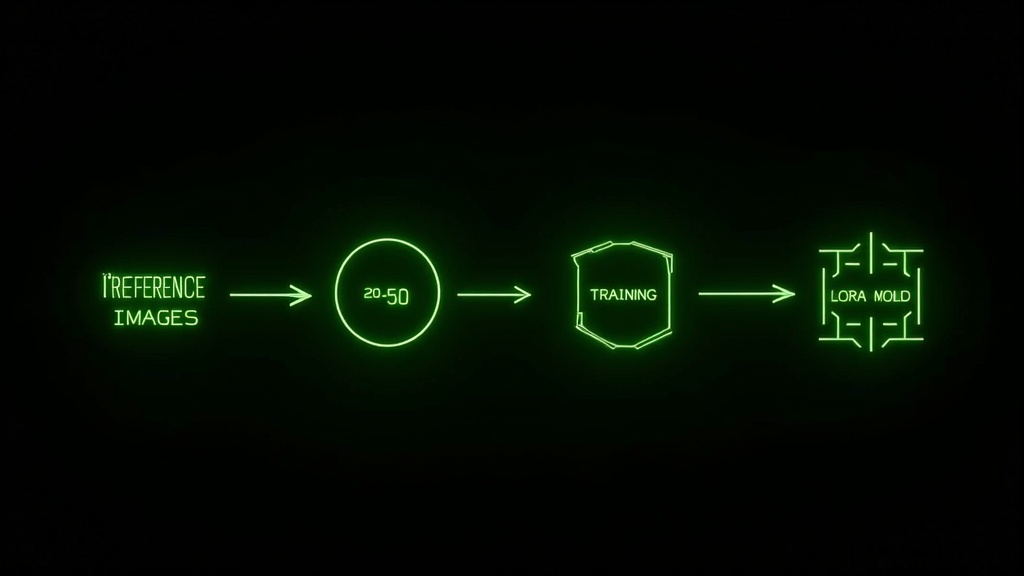
LoRA (Low-Rank Adaptation) training is the most effective method for achieving consistent AI characters. A properly trained LoRA captures your character's identity and applies it consistently to new generations.
Understanding LoRA Basics
| Concept | Explanation |
|---|---|
| What LoRA does | Fine-tunes a small portion of an AI model to recognize a specific subject |
| Training images needed | 15-50 high-quality images of the character |
| Training time | 20-60 minutes typically |
| Output | A small file that can be applied to image generation |
| Consistency impact | 80-95% improvement vs. prompt-only approaches |
Image Selection for LoRA Training
The quality of your training images determines the quality of your LoRA.
Selection criteria:
| Criterion | Why It Matters | Target |
|---|---|---|
| Variety of angles | Ensures 3D understanding | Cover all major angles |
| Consistent identity | LoRA learns what's consistent | All images show same person |
| Expression variety | Natural expression range | 5+ different expressions |
| Lighting variety | Works in different light | Indoor, outdoor, studio |
| High resolution | Better feature learning | 1024px minimum |
| Clean backgrounds | Reduces noise in training | Simple or blurred backgrounds |
What to avoid:
| Problem | Result |
|---|---|
| Too few images | Underfitting, poor generalization |
| Too many images | Overfitting, rigid outputs |
| Inconsistent images | LoRA learns wrong features |
| Low resolution | Loses facial detail |
| Heavy filters | Artificial-looking outputs |
| Extreme angles | Skews understanding of proportions |
LoRA Training Parameters
| Parameter | Recommended Setting | Effect |
|---|---|---|
| Training steps | 1,500-3,000 | Higher = stronger but risk overfitting |
| Learning rate | 1e-4 to 5e-4 | Higher = faster learning, less stable |
| Network rank | 32-64 | Higher = more detail capacity |
| Network alpha | 16-32 | Usually half of rank |
| Resolution | 512-1024 | Match output resolution |
| Batch size | 1-4 | Higher if GPU allows |
Testing and Validating LoRAs
After training, test extensively before production use:
| Test Type | What to Check | Pass Criteria |
|---|---|---|
| Basic generation | Does it produce the character? | Recognizable in 90%+ of outputs |
| Angle variety | Works at different angles? | Consistent across front, 3/4, profile |
| Expression range | Maintains identity with expressions? | Same person regardless of expression |
| Style transfer | Works with different aesthetics? | Character identity survives style changes |
| Edge cases | Unusual prompts or settings? | Doesn't collapse into different person |
LoRA Strength Calibration
| Strength | Effect | Best Use |
|---|---|---|
| 0.5-0.6 | Light influence | Character-inspired, not exact |
| 0.7-0.8 | Moderate influence | Standard content generation |
| 0.85-0.95 | Strong influence | Maximum consistency needed |
| 1.0 | Full influence | Risk of artifacts, rarely optimal |
Most operations find 0.75-0.85 provides the best balance of consistency and flexibility.
Prompt Engineering for Consistency
Even with a trained LoRA, prompt engineering significantly impacts consistency.
Prompt Structure for Character Content
Base prompt template:
[Character trigger word], [age/type], [physical description], [expression], [pose/action], [clothing], [setting], [lighting], [style modifiers]
Example:
sophia_character, 25yo woman, honey blonde wavy hair, hazel eyes, natural makeup, warm smile, sitting casually, cream sweater, modern apartment, soft natural lighting, photorealistic, high detail
Mandatory Prompt Elements
| Element | Purpose | Example |
|---|---|---|
| Character trigger | Activates LoRA | "sophia_character" |
| Age indicator | Maintains age consistency | "25yo woman" |
| Key physical features | Reinforces identity | "honey blonde wavy hair, hazel eyes" |
| Quality modifiers | Ensures good output | "photorealistic, high detail, 8k" |
Negative Prompts for Consistency
Negative prompts prevent common consistency failures:
Standard negative prompt:
deformed, bad anatomy, wrong proportions, extra limbs, clone, duplicate, morbid, mutilated, out of frame, extra fingers, mutated hands, poorly drawn hands, poorly drawn face, mutation, deformed, ugly, blurry, bad proportions, extra limbs, cloned face, disfigured, gross proportions, malformed limbs, missing arms, missing legs, extra arms, extra legs, fused fingers, too many fingers, long neck, different person, inconsistent features
Prompt Consistency Documentation
Create a prompt library with tested, reliable prompts:
| Content Type | Base Prompt | Notes |
|---|---|---|
| Casual selfie | [trigger], selfie, casual outfit, warm smile, soft lighting | Works reliably |
| Fitness content | [trigger], athletic wear, gym setting, confident pose | Add specific outfit details |
| Glamour shots | [trigger], evening wear, studio lighting, elegant pose | Higher risk of inconsistency |
| Beach content | [trigger], swimwear, beach setting, natural lighting | Watch for body proportion shifts |
Reference Image Workflows
Reference images guide generation toward consistent results.
Types of Reference Systems
| System | How It Works | Consistency Level |
|---|---|---|
| LoRA only | Character trained into model | Good (80-90%) |
| LoRA + prompt | Character + detailed description | Better (85-93%) |
| LoRA + img2img | Start from existing character image | Very good (90-95%) |
| LoRA + ControlNet | Pose + face reference | Excellent (93-98%) |
| LoRA + IP-Adapter | Strong face reference | Excellent (95-99%) |
IP-Adapter for Face Consistency
IP-Adapter (Image Prompt Adapter) uses a reference image to guide face generation:
| Setting | Effect | Recommended |
|---|---|---|
| Face weight 0.5 | Light reference influence | When flexibility needed |
| Face weight 0.7 | Moderate influence | Standard content |
| Face weight 0.9 | Strong influence | Maximum face consistency |
| Full face mode | Only references face | When body varies |
ControlNet for Pose Consistency
ControlNet maintains consistent poses across generations:
| ControlNet Type | Use Case | Benefit |
|---|---|---|
| OpenPose | Full body pose matching | Consistent body positioning |
| Depth | Scene depth matching | Consistent proportions in space |
| Canny | Edge-based reference | Maintains outfit outlines |
| Face mesh | Facial expression matching | Same expression different content |
Combining Reference Methods
Optimal workflow for maximum consistency:
- Start with trained LoRA (character identity)
- Add IP-Adapter with face reference (facial features)
- Apply OpenPose ControlNet if needed (body pose)
- Use detailed prompt (additional guidance)
- Set appropriate LoRA strength (0.75-0.85)
This combination achieves 95%+ consistency rates for experienced users.
Quality Control Workflows
Even with excellent generation techniques, quality control catches failures before they reach fans.
Pre-Publication Review Process
| Stage | Check | Action If Failed |
|---|---|---|
| First glance | Obviously wrong? | Reject immediately |
| Face comparison | Match reference set? | Compare side-by-side |
| Body check | Proportions correct? | Check against body references |
| Detail inspection | Hands, fingers, artifacts? | Zoom to 100% |
| Style consistency | Matches persona aesthetic? | Compare to style guide |
| Context check | Setting/caption alignment? | Verify match |
Creating a QC Reference Sheet
Build a single-page reference for quick comparison:
| Section | Content |
|---|---|
| Hero shot | The "this is the character" image |
| Face close-ups | 3 angles for face matching |
| Body proportions | Full-body reference with proportion lines |
| Unacceptable examples | Images that don't pass QC |
| Style guidelines | Key aesthetic requirements |
Batch QC Efficiency
When reviewing large content batches:
Phase 1: Rapid sort (2-3 seconds per image)
- Immediately reject obvious failures
- Flag borderline cases
- Approve clear passes
Phase 2: Borderline review (10-15 seconds per image)
- Compare flagged images to references
- Make final accept/reject decisions
Phase 3: Final selection (30 seconds per image)
- Review approved set for publication
- Final context and caption matching
This process handles 100+ images in under an hour while maintaining quality.
Rejection Criteria
| Issue | Severity | Action |
|---|---|---|
| Wrong face | Critical | Always reject |
| Wrong body type | Critical | Always reject |
| Extra fingers/limbs | Critical | Always reject |
| Minor face variation | Medium | Reject unless batch is short |
| Slightly different hair | Low | Accept if otherwise good |
| Minor artifact | Low | Accept for casual content |
| Wrong style | Medium | Reject or edit |
Common Consistency Failures
Understanding failure modes helps prevent them.
Face Drift
Problem: Character face gradually changes over time as different images are used.
Causes:
- Using inconsistent references
- LoRA strength variation
- Prompt inconsistency
Prevention:
- Lock reference images—never change them
- Document exact LoRA strength for each content type
- Use prompt templates, not improvised prompts
Body Proportion Shifts
Problem: Body looks different sizes or proportions across images.
Causes:
- Different aspect ratios
- Pose-induced perception changes
- Model bias toward certain body types
Prevention:
- Standardize aspect ratios by content type
- Use body reference images
- Include body description in prompts
Style Inconsistency
Problem: Same character looks like different photography styles.
Causes:
- Inconsistent lighting prompts
- Different style modifiers
- Model "creativity" without guidance
Prevention:
- Document lighting standards
- Use consistent style modifier sets
- Add style examples to negative prompts
Expression Lock
Problem: Character only generates well with one expression.
Causes:
- LoRA trained primarily with one expression
- Overfitting during training
Prevention:
- Include expression variety in training set
- Use lower LoRA strength for expression variety
- Add expression-specific prompts
Tools and Platforms for Consistency
Different tools offer different consistency capabilities.
Platform Comparison
| Platform | LoRA Support | Reference Images | Consistency Features |
|---|---|---|---|
| apatero.ai | Built-in LoRA | IP-Adapter, references | Character lock system |
| Midjourney | Style references | Character references v6 | Limited |
| DALL-E 3 | No | No | No dedicated system |
| Stable Diffusion | Full control | All methods | Requires setup |
| Leonardo.ai | LoRA training | Some reference support | Moderate |
apatero.ai Consistency Features
Apatero.ai provides purpose-built consistency tools:
| Feature | Function | Impact |
|---|---|---|
| Character training | Custom LoRA for each persona | 90%+ consistency baseline |
| Reference lock | Saved reference sets | Prevents drift |
| Batch consistency | Same settings across batches | Uniform content libraries |
| QC integration | Built-in comparison tools | Faster review |
| Plan | Monthly Images | Personas (LoRAs) | Price |
|---|---|---|---|
| Independent | 1,500 | 3 | $99/mo |
| Powerhouse | 5,000 | 10 | $199/mo |
Workflow Tools
| Tool Type | Purpose | Options |
|---|---|---|
| Reference storage | Keep references organized | Google Drive, Notion |
| Side-by-side comparison | QC efficiency | Diffchecker, Photoshop |
| Batch processing | High-volume generation | Platform-dependent |
| Version control | Track LoRA versions | Git, manual versioning |
Building a Character Bible
Document everything about your character for long-term consistency.
Character Bible Structure
Section 1: Visual Identity
- Core physical description
- Reference image set
- Acceptable variation ranges
- Unacceptable variations
Section 2: Technical Specifications
- LoRA details and version
- Standard prompts by content type
- Negative prompt requirements
- Generation settings
Section 3: Style Guide
- Fashion preferences
- Color palette
- Makeup standards
- Accessory guidelines
Section 4: Content Guidelines
- Appropriate content types
- Setting preferences
- Lighting standards
- Pose guidelines
Character Bible Example
Physical Identity:
Name: Sophia
Age: 25
Ethnicity: Mixed European
Face: Heart-shaped, defined cheekbones
Eyes: Hazel, slightly upturned, expressive
Hair: Honey blonde, shoulder length, natural wave
Skin: Fair with warm undertones, light freckles across nose
Body: 5'6", athletic-slim, defined waist
Distinctive: Beauty mark on left cheek
Technical:
LoRA: sophia_v2.safetensors (trained Jan 2026)
Strength: 0.8 standard, 0.85 for close-ups
Trigger: sophia_char
Base model: SDXL 1.0
Style:
Aesthetic: Casual luxe, approachable glamour
Colors: Earth tones, cream, dusty rose, sage
Makeup: Natural foundation, defined lashes, nude lip
Jewelry: Minimal gold pieces, small hoops
Sharing Character Bibles
When working with chatters or team members:
| Role | Access Level | Purpose |
|---|---|---|
| Creator/owner | Full bible | Complete reference |
| Chatters | Personality + basics | Character voice consistency |
| Content team | Full bible | Generation consistency |
| Editors | Visual sections | QC and editing |
Scaling Consistency Across Teams
As operations grow, maintaining consistency across multiple people becomes critical.
Training Team Members on Consistency
Week 1: Foundation
- Study character bible completely
- Practice identifying the character in varied images
- Learn rejection criteria
Week 2: Active practice
- Review batches with feedback
- Generate content under supervision
- QC their own work against references
Week 3: Calibration
- Compare judgments against experienced team members
- Align on borderline cases
- Establish personal consistency
Standardizing Generation Settings
| Setting Category | Approach | Documentation |
|---|---|---|
| Model/LoRA | Exact versions specified | Version numbers tracked |
| Strength values | Documented per content type | Settings sheet |
| Prompt templates | Shared template bank | Notion/Google Doc |
| Quality settings | Standardized | Not left to individual choice |
Consistency Audits
Regular audits maintain standards as teams scale:
Weekly:
- Review random sample of published content
- Check for drift or new issues
- Immediate feedback on problems
Monthly:
- Full character consistency review
- Compare recent content to original references
- Adjust LoRA or settings if drift detected
Quarterly:
- Comprehensive bible review
- Retrain LoRA if significant drift
- Update all documentation
Advanced Consistency Techniques
For operations demanding the highest consistency standards.
Multi-LoRA Approaches
| Technique | Use Case | Complexity |
|---|---|---|
| Face LoRA + Style LoRA | Separate face and style control | Medium |
| Age-specific LoRAs | Content requiring age variation | High |
| Expression LoRAs | Specific expression control | High |
| Outfit LoRAs | Recurring outfit consistency | Medium |
Inpainting for Correction
When good images have minor consistency issues:
| Issue | Inpainting Approach | Success Rate |
|---|---|---|
| Wrong eye color | Mask eyes, regenerate | 90%+ |
| Minor face adjustment | Mask face area | 70-80% |
| Hand fixes | Mask hands | 60-70% |
| Background issues | Mask background | 95%+ |
Consistency at Scale
| Monthly Volume | Approach | Time Investment |
|---|---|---|
| 100-500 images | Manual QC all | 5-10 hours/month |
| 500-1,500 images | Batch QC with sampling | 10-15 hours/month |
| 1,500-5,000 images | Tiered QC + team | 20-30 hours/month |
| 5,000+ images | Automated + spot checks | Variable |
Building Your Consistent Character
Ready to create AI influencer content that fans can't distinguish from reality? Character consistency is the foundation.
Apatero.ai provides the tools built specifically for AI influencer consistency:
| Feature | Independent ($99/mo) | Powerhouse ($199/mo) |
|---|---|---|
| AI personas (LoRAs) | 3 | 10 |
| Images per month | 1,500 | 5,000 |
| Videos per month | 150 | 500 |
| Revenue share | Keep 80% | Keep 80% |
| Annual pricing | $799/year (save $389) | $1,499/year (save $889) |
Consistency Launch Checklist
| Step | Action | Time Needed |
|---|---|---|
| 1 | Define character visually | 2-4 hours |
| 2 | Create reference image set | 1-2 hours |
| 3 | Train character LoRA | 1-3 hours |
| 4 | Test and validate | 2-4 hours |
| 5 | Document in character bible | 2-3 hours |
| 6 | Establish QC workflow | 1-2 hours |
| Total | Foundation complete | 10-18 hours |
This upfront investment pays dividends across every piece of content you create. Consistency isn't just quality—it's the foundation of fan trust and sustainable revenue. Start building your consistent character at apatero.ai.
Character consistency requires ongoing attention. Schedule regular audits, update your character bible as you learn what works, and never compromise on quality. Your fans deserve to feel like they're connecting with a real persona.
Apatero Team
Building the future of AI influencer monetization.